How to Download Your Demat Account Statement: Step-by-Step Guide
Blog by Aliceblue News Desk
05 May 2026
11 minutes
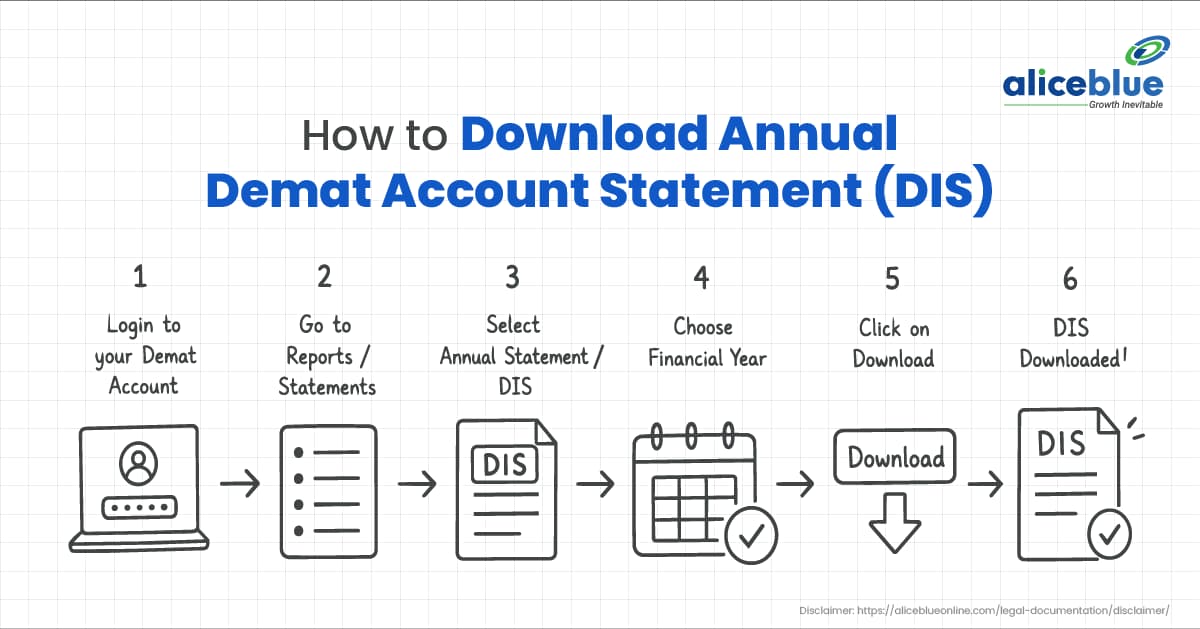
Every April, most retail investors in India face the same problem. Their CA asks for capital gains details, and they have no clue where to find an official record of what they bought and sold during the year. Scrolling through contract notes one by one is not a solution. Your demat account statement has that answer. Every transaction, every holding, in one place.
This guide covers how to download your demat account statement from Alice Blue, CDSL, NSDL, and DigiLocker with accurate steps, the right URLs, and correct PDF password formats for each method.
What Is a Demat Account Statement?
A demat account statement is an official record of all securities held in your demat account, along with every transaction made during a chosen period. It is issued by your Depository Participant, which in most cases is your stockbroker.
In India, all demat accounts sit with one of two central depositories:
- CDSL (Central Depository Services Limited) — 16-digit account number
- NSDL (National Securities Depository Limited) — 14-digit account number
Check your account number. Those digits tell you which depository holds your account and which download method you need to follow.
The statement includes:
- Every buy and sell transaction with date, quantity, and value
- Securities transferred in or out of your account
- Current holdings with ISIN numbers and market value
- Opening and closing balances for the statement period
- Pledged or locked-in securities, relevant for ESOP holders or margin pledging
Why You Need to Download It Every Year
Most investors only think about this document when their CA asks for it in June. By then, CDSL and NSDL portals are slow, and your CA is stretched thin. Pull your FY statement in the first week of April. If something looks wrong, you have weeks to get it corrected rather than hours before the filing deadline.
Here is when you will specifically need it:
- ITR filing — Short-term and long-term capital gains from equity go into Schedule CG. Your broker’s P&L report covers most of it, but the demat statement is the depository’s official record and carries more weight if a discrepancy is ever questioned.
- Loan applications — Banks ask for proof of financial assets. Your demat statement qualifies as valid investment proof.
- Portfolio audit — If the holdings in your broker app do not match your statement, a processing error has occurred and needs to be reported.
- ESOP and pledged shares — Your statement shows locked-in and pledged quantities separately from freely tradeable shares, so you know exactly what you can and cannot sell.
Method 1: Download from Alice Blue
Alice Blue users have two ways to get their statement.
Using the Alice Blue BOT (Recommended):
- Go to bot.aliceblueonline.com
- Log in with your Alice Blue credentials
- Type Holding Statement in the chat or select it from the menu
- Choose the financial year when prompted
- The BOT generates your statement and delivers it to your registered email, or lets you download it directly from the chat
This is Alice Blue’s own recommended method. It works regardless of which platform version you are using and does not require navigating any menus.
Using ANT Web:
- Log in at ant.aliceblueonline.com
- Go to the Portfolio section
- Open the Holdings or Reports tab
- Select the financial year or set the date range from 1 April to 31 March
- Click Download and choose PDF or Excel
For RISE users: If you access Alice Blue through rise.aliceblueonline.com, the portfolio and holdings sections follow the same logic. If you cannot locate the download option, use the BOT method above, as it works across all Alice Blue platforms.
PDF password: If the downloaded file is password-protected, enter your PAN number in uppercase. For example, ABCDE1234F.
Method 2: Download from CDSL
Use this method if your demat account number is 16 digits.
- Go to www.cdslindia.com
- Click Login from the top menu and select Investor Login
- Navigate to e-CAS (Electronic Consolidated Account Statement)
- Enter your 16-digit demat account number and PAN number
- Enter the OTP sent to your registered mobile or email
- Select the financial year or a custom date range
- Click Generate e-CAS and then Download
The CDSL e-CAS covers every demat account and mutual fund folio linked to your PAN, not just your Alice Blue account. If you invest across multiple brokers or hold direct mutual funds, this single document covers everything.
PDF password: The password for CDSL e-CAS PDFs is your PAN number in uppercase. If it does not open, check the email CDSL sent along with the download. The password is sometimes included in that email.
Useful to know: CDSL automatically sends a CAS to your registered email every month in which at least one transaction occurs. Check your inbox for emails from [email protected]. You may already have the statement you need sitting in your inbox without logging into any portal.
Method 3: Download from NSDL
NSDL has two separate portals. Using the wrong one is the most common reason users get confused.
For your individual account holdings statement:
- Go to https://eservices.nsdl.com
- Click on IDeAS and log in with your User ID and password
- If this is your first time, click Register and complete the setup using your 14-digit NSDL account number, PAN, and registered mobile number
- After logging in, go to the Demat Account and select View Holding or Transaction Statement
- Choose the financial year date range
- Click Download
For the Consolidated Account Statement across all investments:
- Go to https://nsdlcas.nsdl.com
- Enter your PAN, email, and mobile number
- Verify with the OTP sent to your registered contact
- Select the period and download
Use eservices.nsdl.com for your single NSDL account statement. Use nsdlcas.nsdl.com if you want a full picture across all demat accounts and mutual funds linked to your PAN.
PDF password: Enter your PAN number in uppercase.
Useful to know: NSDL also emails your CAS automatically every month when a transaction occurs. Check your inbox for emails from [email protected] before logging into either portal.
Method 4: Download Through DigiLocker
This method works only for CDSL account holders. NSDL users should use the IDeAS portal above.
- Go to www.digilocker.gov.in or open the DigiLocker app
- Log in with your Aadhaar-linked mobile number
- Tap Search Documents and search for CDSL
- Select Consolidated Account Statement
- Enter your 16-digit CDSL demat account number and PAN
- Verify with the OTP sent to your Aadhaar-linked number
- Your CAS is fetched and stored in DigiLocker
The DigiLocker version is government-verified and accepted for loan applications and visa documentation.
How to Read Your Demat Account Statement
- Opening Balance
The securities you held at the start of the statement period. For FY 2024-25, this is your portfolio as of 31 March 2024. - Transaction History
Every purchase and sale during the period should have exact dates, quantities, and values. This is the section your CA uses to fill Schedule CG. - Closing Balance
Your holdings at the end of the period, which for FY 2024-25 means 31 March 2025. - Market Value Column
This is the closing price of your securities on the statement date, not your buy price. It reflects current portfolio value, not profit or loss. Do not use this column for capital gains calculations. - Pledged and Locked-In Securities
Shares pledged against a margin facility or ESOPs under a lock-in period appear here separately. They are still yours, but cannot be sold until the pledge or lock-in is released. - ISIN
A 12-character code that uniquely identifies each security. For example, INE009A01021 is the ISIN for Infosys. This is useful when a company name appears differently across documents.
A Practical Example: Using the Statement for ITR Filing
Priya opened her Alice Blue demat account in April 2024. During FY 2024-25, she made the following transactions:
- June 2024: Bought 100 shares of HDFC Bank at Rs 1,500 each
- February 2025: Sold all 100 shares at Rs 1,720 each. Held for 8 months, so this qualifies as Short-Term Capital Gain.
- September 2024: Bought 50 shares of Titan at Rs 3,200 each. Still holding as of 31 March 2025.
Her annual demat statement for FY 2024-25 shows:
Security | Action | Qty | Buy Price | Sell Price | Gain or Loss |
HDFC Bank | Bought and Sold | 100 | Rs 1,500 | Rs 1,720 | Rs 22,000 STCG |
Titan | Bought and Holding | 50 | Rs 3,200 | Not Applicable | Unrealised |
Priya’s STCG of Rs 22,000 on HDFC Bank is taxable at 20% as per the Budget 2024 rules on listed equity. Her Titan shares appear only in the closing balance since she has not sold them, and no tax event is triggered.
Her CA uses this transaction history to fill Schedule CG in Priya’s ITR-2. Without the demat statement, the CA would have to piece together the same data from individual contract notes across eight months.
Demat Statement vs. Consolidated Account Statement
Feature | Demat Account Statement | Consolidated Account Statement |
Issued by | Your broker or DP | CDSL or NSDL |
Covers | Single demat account | All demat accounts and MF folios under your PAN |
Includes mutual funds | No | Yes |
Available via DigiLocker | No | Yes, CDSL only |
Auto-emailed monthly | No | Yes, when transactions occur |
Best for | Single broker ITR filing | Full portfolio view across all investments |
Password protected | Sometimes | Always |
If all your equity investments are in one Alice Blue account, your broker statement is sufficient for ITR. If you hold direct mutual funds or accounts with multiple brokers, download the CAS from CDSL or NSDL.
Common Mistakes to Avoid
- Wrong date range
For ITR purposes, the correct period is always 1 April to 31 March. A partial-year download gives you incorrect capital gains figures. Always confirm the date range before downloading. - Wrong NSDL portal
For your single account holding statement, use eservices.nsdl.com and go through IDeAS. For everything linked to your PAN, use nsdlcas.nsdl.com. Going to the wrong portal is the top reason NSDL users think their statement is unavailable. - Wrong PDF password
For CDSL and NSDL PDFs, the password is your PAN in uppercase. If it does not work, check the email that came with the download before assuming the file is corrupted. - Using only the broker P&L report
A broker’s P&L report is internally calculated and can differ from the depository record after corporate actions like bonus shares, stock splits, or rights issues. Always cross-check with the official demat statement before filing your ITR. - Missing pledged holdings
If you pledged shares for margin and skip that section of the statement, you may undercount your actual holdings. Pledged shares remain yours and must be included in your ITR asset declaration.
Conclusion
Your annual demat account statement is a five-minute download that removes the most time-consuming part of ITR preparation. Use the Alice Blue BOT for the quickest single-account download. For a complete view across all brokers and mutual funds, go to CDSL or NSDL directly. Download in the first week of April when portals are responsive, and your CA still has time to work through any issues the statement might reveal.
If you’re planning to start investing, you can open a demat account with Alice Blue and get started.
Frequently Asked Questions
Go to bot.aliceblueonline.com, log in, and type Holding Statement. Select your financial year, and the BOT will deliver the file to your registered email. You can also access it through the Portfolio section on ANT Web.
Enter your PAN number in uppercase, for example, ABCDE1234F. If the file does not open, check the email CDSL sent with the statement. The password is sometimes included there.
For your single NSDL account holding statement, go to https://eservices.nsdl.com and log in through IDeAS. For a consolidated view covering all accounts and mutual funds linked to your PAN, go to https://nsdlcas.nsdl.com.
A demat statement covers only one broker account. A Consolidated Account Statement from CDSL or NSDL covers all demat accounts and mutual fund folios under your PAN in a single document.
Check your demat account number. 16 digits means CDSL. 14 digits means NSDL.
Yes. The transaction history gives your CA the exact buy dates, sell dates, quantities, and values needed to calculate STCG and LTCG for Schedule CG of your ITR.
Contact Alice Blue support immediately. If the issue is not resolved within a reasonable time, file a complaint at SEBI’s SCORES portal at scores.sebi.gov.in. SEBI mandates a response within 21 working days.
Yes. CDSL emails your CAS every month in which at least one transaction occurs. Check your inbox for emails from [email protected]. The annual on-demand download from the CDSL portal is separate from these automatic monthly emails.

Blog by Aliceblue News Desk