NEFT Transfer Timings, Charges & Step-by-Step Process 2026
Blog by Aliceblue News Desk
09 April 2026
13 minutes
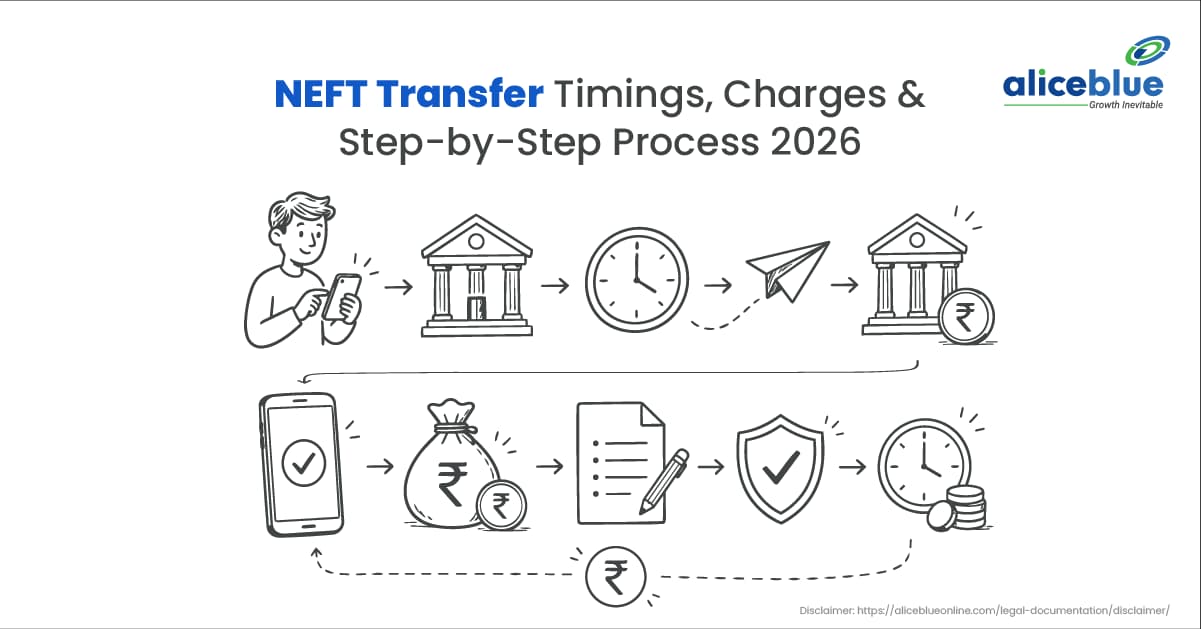
Most people transfer money through NEFT every week without really knowing how it works, when it settles, or what to do when the money does not show up on the other end. This guide covers all of that — timings, charges, the actual transfer process, and what to do if something goes wrong.
What Is NEFT?
NEFT stands for National Electronic Funds Transfer. It is a payment system run by the Reserve Bank of India that lets you move money electronically from one bank account to another across India.
What makes NEFT different from IMPS is how it processes transactions. NEFT does not move money the moment you click transfer. Instead, it collects multiple transfer requests and processes them together in batches, one batch every 30 minutes. So your money moves quickly, but not instantly.
The system has been around since 2005. Back then, it only worked during banking hours on weekdays. Today, online NEFT runs around the clock, every day of the year.
How NEFT Timings Changed After 2019
A lot of people are still operating on old information about NEFT timings. Here is what actually changed:
Period | NEFT Availability |
Before December 2019 | Weekdays only, 8:00 AM to 6:30 PM. Not available on weekends or holidays. |
From December 2019 Onwards | 24 hours, 7 days a week, 365 days a year for online transfers |
The RBI made this change to bring NEFT on par with digital payment systems like IMPS. For anyone using internet banking or a mobile app, there is no timing restriction for online NEFT in 2026.
NEFT Timings in 2026
Online NEFT (Net Banking / Mobile App)
Online NEFT is available all day, every day, including Sundays and public holidays. However, there is one condition to keep in mind after hours:
Time Window | Days | Per Transaction Limit |
7:00 AM – 7:00 PM | All working days | No upper limit |
7:00 PM – 7:00 AM | All days | ₹1 crore per transaction |
All hours | Weekends and holidays | ₹1 crore per transaction |
Settlements run every 30 minutes throughout the day. So if you initiate a transfer at 3:45 PM, it will be picked up in the 4:00 PM batch and credited within the next 30 to 60 minutes.
Branch NEFT Timings (Bank-Wise)
If you are visiting a bank branch to submit an NEFT request in person, each bank has its own cut-off time. Once you miss the cut-off, your request gets queued for the next working day.
Bank | Weekday Cut-Off | Saturday Cut-Off |
State Bank of India | 8:00 AM – 7:00 PM | 8:00 AM – 1:00 PM |
HDFC Bank | 8:00 AM – 6:30 PM | 8:00 AM – 6:30 PM |
ICICI Bank | 8:00 AM – 6:30 PM | 8:00 AM – 6:30 PM |
Axis Bank | 8:00 AM – 6:00 PM | 8:00 AM – 6:00 PM |
Punjab National Bank | 8:00 AM – 7:00 PM | 8:00 AM – 1:00 PM |
Canara Bank | 8:00 AM – 5:00 PM | 8:00 AM – 12:00 PM |
Kotak Mahindra Bank | 8:00 AM – 5:30 PM | 8:00 AM – 12:00 PM |
These timings are for branch counters only. Online transfers from the same banks are available 24/7.
NEFT Holidays in 2026
Online NEFT runs even on national holidays. But it is worth knowing the days when the NEFT branch will not be processed:
National Holidays:
- Republic Day — 26 January
- Bank’s Annual Closing Day — 1 April
- Good Friday — 29 March
- Independence Day — 15 August
- Gandhi Jayanti — 2 October
- Christmas — 25 December
Add Your Heading Text Here
- Holi — 14 March
- Ram Navami — 6 April
- Mahavir Jayanti — 10 April
- Eid ul-Fitr — 31 March
- Bakra Eid — 16 June
- Dussehra — 2 October
- Diwali/Laxmi Puja — 20 October
- Guru Nanak Jayanti — 5 November
On all of these days, your online NEFT will still go through. Only branch counters will be closed.
NEFT Charges in 2026
The RBI removed charges on all online NEFT transactions back in 2019. If you transfer through your bank’s app or net banking portal, there is no fee.
Branch-based NEFT is a different story. Banks are allowed to charge a service fee for in-person requests.
Typical Branch NEFT Charges
Transfer Amount | Approximate Charge |
Up to ₹10,000 | ₹2.50 + GST |
₹10,001 to ₹1 lakh | ₹5 + GST |
₹1 lakh to ₹2 lakh | ₹15 + GST |
Above ₹2 lakh | ₹25 to ₹50 + GST |
Add Your Heading Text Here
Bank-Wise NEFT Charges (Branch)
Bank | Minimum Charge | Maximum Charge |
SBI | ₹2 + GST | ₹25 + GST |
HDFC Bank | ₹2 + GST | ₹10 + GST |
ICICI Bank | ₹2.25 + GST | ₹24.75 + GST |
Punjab National Bank | ₹2 + GST | ₹20 + GST |
Axis Bank | Free | Free |
Canara Bank | ₹2.25 + GST | ₹24.75 + GST |
IndusInd Bank | ₹2.50 + GST | ₹50 + GST |
Online NEFT from all these banks is free of charge regardless of the transfer amount.
NEFT Transfer Limits in 2026
The RBI has set no minimum or maximum limit for NEFT. You can technically transfer ₹1 through NEFT. In practice, individual banks apply their own daily and per-transaction limits.
Limit Type | RBI Rule | Bank Practice |
Minimum amount | ₹1 | ₹1 (most banks) |
Maximum per transaction | No RBI cap | ₹2 lakh to ₹1 crore (varies by bank) |
Daily cumulative limit | No RBI cap | ₹10 lakh to ₹1 crore (varies by bank) |
Check your bank’s net banking portal or call customer support to find your specific daily limit.
How NEFT Actually Works (Behind the Scenes)
Here is what happens from the moment you click “Transfer” to the moment the beneficiary sees the money:
- You submit the request via app, net banking, or at a branch counter.
- Your bank logs the request and sends it to the NEFT pooling centre (Service Centre).
- The pooling centre forwards all collected requests to the NEFT Clearing Centre operated by the RBI.
- At the next 30-minute interval, the clearing centre processes the full batch.
- It sorts transactions bank-wise and passes settlement instructions.
- The receiving bank gets the instruction and credits the beneficiary account.
- Both sender and receiver get an SMS and email confirmation.
The full cycle from submission to credit typically takes between 30 minutes and 2 hours. The exact time depends on which part of the 30-minute batch window you fall into.
How to Transfer Money via NEFT Online (Step-by-Step)
Adding a New Beneficiary
Before you can send money, you need to register the recipient as a beneficiary. This is a one-time step.
- Log in to your bank’s net banking portal or mobile app.
- Go to Fund Transfer → Add Beneficiary → NEFT/Other Bank.
- Enter the recipient’s name, bank account number, IFSC code, and bank branch.
- Confirm the addition via OTP sent to your registered mobile number.
- Wait for the beneficiary to get activated. Most banks take 30 minutes to 24 hours before the first transfer can go through.
Initiating the Transfer
Once the beneficiary is active:
- Go to Fund Transfer → NEFT.
- Select the beneficiary from your saved list.
- Enter the amount you want to transfer.
- Add a remark or narration (useful for record-keeping).
- Review all the details — account number, IFSC, and amount.
- Confirm with the OTP sent to your mobile number.
- Save the UTR number from the confirmation screen. You will need this if the payment is delayed or not credited.
How to Transfer Money via NEFT at a Bank Branch (Offline)
For those who prefer or need to visit a branch:
- Visit your bank branch during working hours (see the bank-wise cut-off table above).
- Collect the NEFT fund transfer form from the counter.
- Fill in:
- Your account number and name
- Beneficiary name, account number, and IFSC code
- Transfer amount and date
- Submit the form to the teller along with a cheque or a debit instruction.
- Collect the acknowledgement slip, which will carry the transaction reference number.
- Branch charges will apply as per the table above.
The branch will submit the request in the next available NEFT batch. If you submit close to the cut-off time, the transfer will be processed the following working day.
How to Track Your NEFT Payment Using the UTR Number
Every NEFT transaction generates a UTR (Unique Transaction Reference) number. This is your proof of payment and your tracking ID.
Where to find your UTR number:
- On the transaction confirmation screen
- In the SMS or email confirmation from your bank
- Inside your bank statement (listed against the transaction)
How to use the UTR number:
- Share it with the beneficiary to cross-check on their end
- Quote it when following up with your bank’s customer support
- Use it when filing a complaint with the RBI ombudsman.
How to check NEFT payment status:
- Log in to your bank’s net banking portal
- Go to Transaction History or Payment Status
- Search by date or UTR number
- The status will show as ‘Pending’, ‘Processed’, or ‘Failed’.
If the status remains “Pending” beyond 2 hours during working hours, contact your bank immediately.
What If Your NEFT Is Not Credited?
This comes up more often than banks would like to admit. Here is the RBI rule you need to know:
The RBI mandates that if an NEFT credit is delayed beyond 2 hours from the scheduled settlement time, the beneficiary’s bank must pay penalty interest at the RBI’s Repo Rate + 2%.
This penalty is auto-applied, you do not need to ask for it. But you do need to follow up actively.
Steps to take if NEFT is not credited:
- Check the UTR status on your bank’s portal first.
- Contact your bank’s customer care and quote the UTR number and transfer details.
- If the bank does not resolve it within 5 working days, escalate to RBI’s Integrated Ombudsman at cms.rbi.org.in.
- Most NEFT failures occur because of wrong IFSC codes or account number mismatches. In case of a failed transaction, the amount is returned to the sender within 2 working days.
Can You Use NEFT for Credit Card Payments?
Yes, and many people do not know this. You can pay your credit card bill through NEFT by using your credit card account number as the beneficiary account number and the card issuer’s NEFT IFSC code.
Here is how:
- Beneficiary name: As printed on your credit card
- Account number: Your 16-digit credit card number
- IFSC code: Each bank has a specific IFSC for credit card and NEFT payments
For example, HDFC credit card payments via NEFT use the IFSC code HDFC0000128. SBI card payments use SBIN0000300.
This is particularly useful when the credit card app is down or when you want to pay from a different bank’s account.
Practical Example
You want to transfer ₹75,000 from your SBI savings account to your Alice Blue trading account.
- You log in to SBI’s YONO app
- Navigate to Fund Transfer → NEFT
- Add Alice Blue’s partner bank account as a beneficiary (ICICI Bank with the relevant IFSC)
- After a 30-minute activation, you initiate the transfer at 2:20 PM
- The 2:30 PM batch picks it up
- Funds are credited to the Alice Blue account by approximately 3:00 PM
- You receive a UTR reference number via SMS
- Zero charges applied since the transfer was done online
If you had done the same transfer at a branch, you would have paid around ₹25 + GST.
NEFT vs RTGS vs IMPS: Which One Should You Use?
Feature | NEFT | RTGS | IMPS |
Settlement | Batch (every 30 mins) | Real-time, transaction-by-transaction | Real-time, instant |
Minimum Transfer | ₹1 | ₹2 lakh | ₹1 |
Maximum Transfer | No RBI cap | No RBI cap | ₹5 lakh |
Speed | 30 mins – 2 hours | Within minutes | Instantly |
Availability | 24×7 online | 24×7 | 24×7 |
Online Charges | Free | Free (most banks) | Small fee at some banks |
Best For | Routine transfers, no urgency | Large, time-sensitive transfers | Instant small/mid transfers |
Quick rule of thumb:
- Routine payment with no urgency → NEFT
- Large amount, needs to land fast → RTGS
- Small or urgent transfer, especially on a holiday → IMPS
Key Features of NEFT
- Runs 24×7, 365 days a year for online transactions
- Batch settlements every 30 minutes — not real-time
- Free for all online transfers across all banks
- Accepted by all scheduled commercial banks in India
- Supports both individual and business account transfers
- No upper limit set by RBI — only bank-level caps apply
- Works for savings accounts, current accounts, and credit card bill payments
- Regulated directly by the Reserve Bank of India
Advantages of NEFT
- No cost for online transfers: If you use your bank’s app or net banking, NEFT is completely free regardless of the amount.
- No upper limit (RBI level): You can move large amounts that would breach IMPS limits.
- Available on weekends and holidays: Online NEFT does not shut down on any day of the year.
- Safe and regulated: Every transaction runs through RBI’s clearing infrastructure.
- Works for credit card payments: Useful when paying bills across bank accounts.
- No minimum amount: Even micro-transfers are supported.
Limitations of NEFT
- Not instant: If the next batch is 25 minutes away, your money waits. For urgent transfers, this is a real problem.
- Beneficiary activation delay: New beneficiaries take up to 24 hours to activate. Plan ahead.
- After-hours transaction cap: Beyond 7 PM and on weekends, each transfer is capped at ₹1 crore — enough for retail users, but relevant for businesses.
- Branch transfers are charged: If you cannot use digital banking, expect fees every time.
- Wrong details = delay: Even a single wrong digit in the IFSC code can cause a failed transaction. The reversal may take up to 2 working days.
Common Mistakes to Avoid
- Wrong IFSC code: This is the single most common cause of failed NEFT transactions. Always double-check the IFSC code on the recipient’s cheque book or bank website, not from memory.
- Ignoring beneficiary activation time: Several people transfer right after adding a new beneficiary and then wonder why the transaction failed. Wait for the activation confirmation.
- Not saving the UTR number: The UTR is your only proof of transaction. Without it, following up with the bank becomes much harder.
- Using NEFT for urgent same-day needs: If the money must land in the next 10 minutes, NEFT is not the right tool. Switch to IMPS.
- Assuming branch NEFT works on all days: Branch NEFT is unavailable on the second and fourth Saturdays, Sundays, and all public and festival holidays.
- Entering ₹0 or an insufficient balance: The transaction fails, and your daily limit still gets counted at some banks.
Who Should Use NEFT?
NEFT works well for:
- Investors funding their trading accounts or moving profits between accounts
- Salaried individuals paying EMIs, rent, or regular bills
- Small and mid-size businesses are paying suppliers without urgency
- Anyone making credit card payments from a different bank
- People are sending large amounts that exceed IMPS limits
NEFT is not the right choice for:
- Anyone who needs instant credit (use IMPS)
- Time-critical payments near the end of the day, where a batch delay could cause a problem
- People who do not have access to the internet or mobile banking and want to avoid branch charges
NEFT is one of the most practical payment tools available to Indian bank account holders today. It is free online, covers the full country, works around the clock, and handles everything from a ₹500 transfer to a ₹50 lakh fund movement. The only thing it does not do is move money instantly; that is where IMPS steps in. For most routine transfers, including funding your trading or investment accounts, NEFT is the most cost-effective option available. The key habit to build is always saving the UTR number. That one step will save you a lot of follow-up if a transfer ever takes longer than expected.
Frequently Asked Questions
Online NEFT is available 24 hours a day, 7 days a week, 365 days a year. After 7 PM and on weekends, each transaction is capped at ₹1 crore. Branch NEFT follows each bank’s counter hours, typically between 8:00 AM and 5:00–7:00 PM on weekdays.
Yes, NEFT initiated through internet banking or a mobile app is free at all banks. Branch-based NEFT carries a fee ranging from ₹2.50 to ₹50 + GST, depending on the transfer amount and bank.
NEFT processes transactions in batches every 30 minutes. The credit to the recipient’s account typically happens within 30 minutes to 2 hours from submission.
For online NEFT, there is no daily cut-off since it runs 24×7. For branch NEFT, cut-off times vary by bank, as SBI closes at 7:00 PM on weekdays, HDFC Bank at 6:30 PM, and Canara Bank at 5:00 PM.
The RBI has set no minimum or maximum limit. Banks apply their own caps, typically ₹1 to ₹1 crore per transaction for retail users online. After 7 PM, online NEFT transactions are capped at ₹1 crore per transfer.
Online NEFT works on Sundays and all holidays, including Diwali and Eid. Branch counters are closed on these days, so offline NEFT is not available.
Save the UTR number from your transaction confirmation. Log in to your bank’s net banking portal, go to Transaction History or Payment Status, and search by UTR number or date.

Blog by Aliceblue News Desk